;%20}%20.cls-2%20{%20fill:%20%23ced6ed;%20}%20%3c/style%3e%3clinearGradient%20id='linear-gradient'%20x1='1964.71'%20y1='4000'%20x2='1964.71'%20y2='0'%20gradientUnits='userSpaceOnUse'%3e%3cstop%20offset='0'%20stop-color='%2391b2dd'/%3e%3cstop%20offset='1'%20stop-color='%234f6ab2'/%3e%3c/linearGradient%3e%3c/defs%3e%3cpath%20class='cls-1'%20d='M1508.54,1680.88c206.61,411.21,54.74,697.8-92.14,974.95-186.92,352.74-363.53,686.21,193.54,1324.04,11.11,12.72,28.64,20.14,47.17,20.14h74.12s0,0,0,0c-185.99-317.81-234.22-563.63-156.91-774.76,75.75-206.88,259.73-353.25,454.51-508.22,253.73-201.86,516.09-410.58,620.81-796.57,49.92-184.01,58.97-394.1,26.74-632.56-.66-4.89-2.16-9.71-4.42-14.24L2052.94,30.78c-20.44-41.05-88.32-41.04-108.74.02l-645.19,1297c-8.09,16.26-5.6,34.9,6.28,49.34,86.8,105.49,154.4,206.51,203.25,303.74Z'/%3e%3cpath%20class='cls-2'%20d='M2991.88,1915.98c-22.18-44.53-98.4-38.61-110.2,8.75-2.14,8.6-4.37,17.15-6.67,25.65-116.43,429.1-412.6,664.74-673.93,872.64-364.61,290.07-629.61,501.02-237.35,1149.97,10.01,16.56,29.95,27.01,51.71,27.01h1926.37c41.7,0,69.84-36.53,53.46-69.41l-1003.39-2014.61Z'/%3e%3cpath%20class='cls-2'%20d='M1201.33,2600.03c146.4-276.28,288.28-544.51,43.06-950.7-23-38.1-87.34-36.18-106.96,3.27L4.8,3929.47c-16.62,33.42,11.98,70.53,54.35,70.53h1189.73c46.8,0,75.13-44.53,49.58-78.15-469.78-618.37-272.75-990.43-97.13-1321.81Z'/%3e%3c/svg%3e)
All your weather data, in one native app.
Radar, models, satellite, observations, reports and warnings, together in a single application built for the desktop. No browser and no webview.
Features
One app for quick checks and detailed analysis.
Atmos has a mode for every kind of work. All of them share the same map, the same data and the same assets.
Home
A dashboard built around you.
Home is made of widgets you choose. Current conditions and radar for your locations, active warnings, model snapshots, saved views, and activity from the Workshop and your chat rooms. Set it up once and it is there every time you open Atmos.
- Customizable widgets
- Saved views and locations
- Warnings at a glance
- Workshop and Chat activity
Quick Mode
The essentials, fast.
Quick Mode is a single view for a fast check. Search for a location, choose a product, and the data is in front of you with nothing else to configure. When you need more, switch to Advanced Mode without losing your place.
- One view, no setup
- Location search
- Instant product switching
- Move to Advanced Mode in one step
Advanced Mode
Full control over every layer.
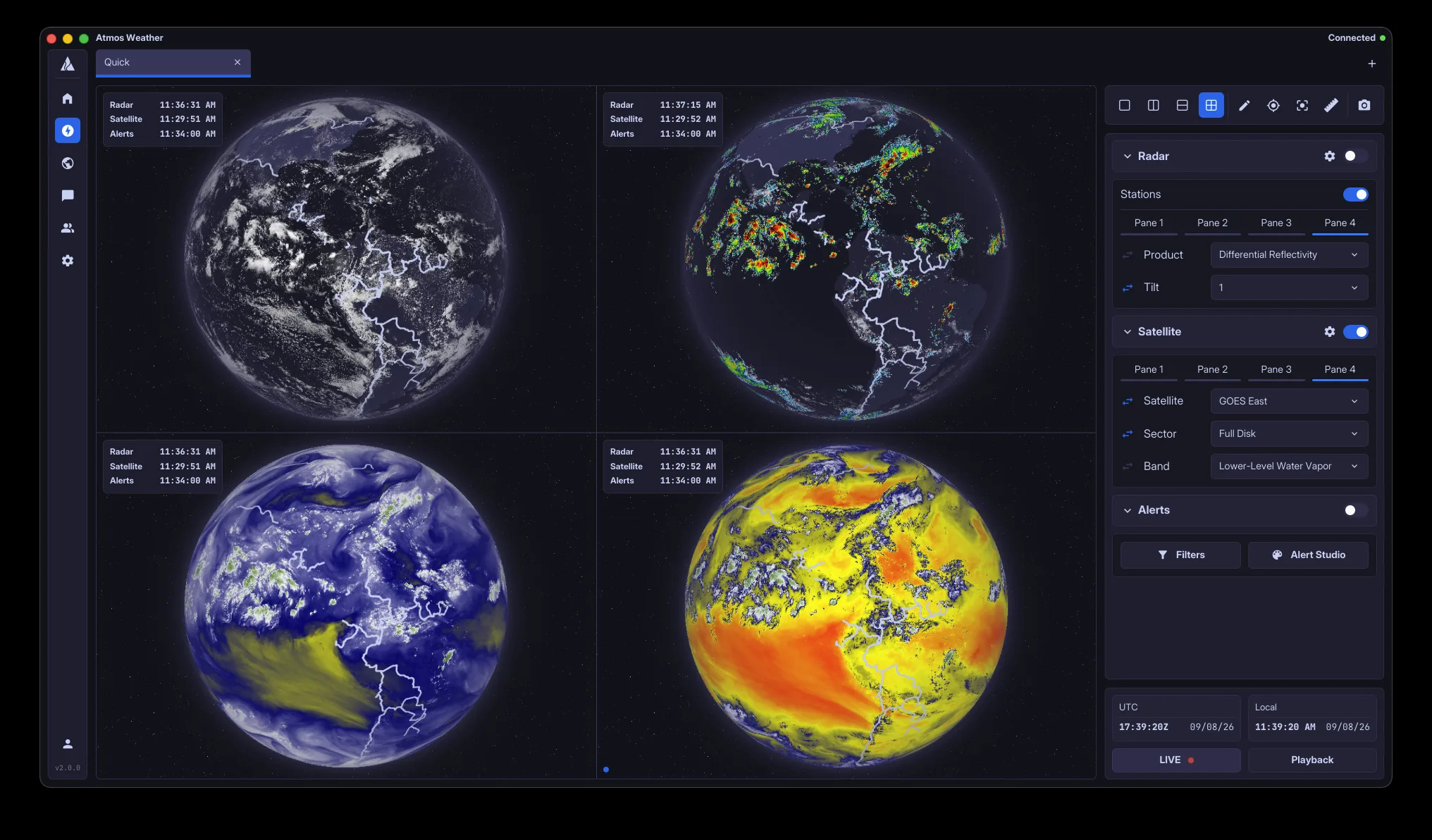
Advanced Mode opens the complete layer system. Combine datasets, adjust every parameter, split the view into panes that share one camera and one clock, and use the analysis tools built into the map.
- Complete layer control
- Up to four panes per view
- Analysis tools on every layer
- Saved layouts for different situations
Archive Mode
Historical analysis.
Load any past event and review it as it unfolded. Archive Mode uses the same map, the same layers and the same tools as live data, so nothing changes when you move between the two.
- Historical radar, satellite and more
- Any date and time range
- Frame-by-frame playback
- The same tools as live mode
Workshop
Share and collaborate on assets.
The Workshop is a community library of color tables, layouts, map styles and more. Publish your own, use what others have made, and collaborate on assets with other members. Anything in the Workshop installs directly into Atmos.
- Color tables, layouts and map styles
- Community asset library
- Collaboration with other members
- Direct installation into Atmos
Chat
Chat with your friends and your team.
Chatrooms are built into the app. Share an asset or a live map view directly in a message, and everyone in the room can open it in one click and see exactly what you see.
- Rooms for friends and teams
- Link assets and map views in messages
- Open a linked view in one click
- No need to leave the app
Data
Every dataset, on one map.
Atmos handles the full range of weather data on a single map and a single timeline. Change the time and every dataset moves together. Data arrives as it is published, so what you see is current.
Radar
Level II and Level III products from every NEXRAD site, with every tilt. Live, looping and archived.
Models
Forecast model guidance on the same map as your observations, with the same timeline controls.
Satellite
GOES-East and GOES-West imagery. Visible, infrared and water vapor bands, in step with the rest of your data.
Observations
Surface and upper-air observations, updated as they arrive.
Reports
Storm reports and spotter input, plotted where they happened.
Warnings
NWS watches, warnings and advisories the moment they are issued, drawn on the official county and zone boundaries.
Tools
Built for detailed analysis.
The same set of tools is available on every layer and in every mode, live or archived.
Inspect
Read the exact value under the cursor on any layer.
Crosshair
Pin a point and track it across products, tilts and time.
Measure
Distance and bearing between any two points on the map.
Annotate
Draw on the map and keep your notes with the view.
Multi-pane
Split a view into two or four panes that share one camera and one clock.
Playback
Loop the last fifteen minutes or the last three days, live or from the archive.
Native
Built for the desktop, not for a browser.
Atmos is a native application. It does not run inside a browser or a webview, and it is not a website packaged as a desktop app. Every part of it, from the map to the chat, was built to run directly on your computer.
A custom map engine
The map engine was built specifically for weather data rather than adapted from a general mapping toolkit. It renders every dataset directly and at full resolution.
One shared core
A single core engine powers Atmos on every platform. Features, performance and assets are the same wherever you use it.
Performance
Smooth panning, immediate product switching and playback that stays responsive during severe weather.
Customization
Set it up the way you work.
Nearly every part of Atmos can be adjusted, and anything you build can be shared through the Workshop.
Layouts
Arrange panels and panes the way you work, and save layouts for different situations.
Tabs and windows
Keep multiple views open in tabs, and run Atmos across more than one monitor.
Color tables
Use the built-in tables or install your own, from a file or from the Workshop.
Keyboard shortcuts
Rebind any action to the keys you already know.
Themes
Light and dark themes, applied across the whole app.
Home widgets
Choose which widgets appear on Home and where they sit.
FAQ
Common questions.
Is Atmos a web app?
No. Atmos is a native desktop application. It does not run inside a browser or a webview, and it is not a website packaged as a desktop app.
Which platforms are supported?
The beta is available for macOS and Windows. The same core engine runs on every platform Atmos ships on, so features and assets carry over.
What data does Atmos include?
Radar, forecast models, satellite imagery, surface and upper-air observations, storm reports, and NWS watches, warnings and advisories.
Can I work with past events?
Yes. Archive Mode loads historical data for any date and time range, with the same map and tools as live data.
Can I share my setup with other people?
Yes. Color tables, layouts and map styles can be published to the Workshop, and any asset or map view can be linked directly in a Chat message.
How do I get access?
Atmos is in closed beta. Create an account with an access key and you will receive the first build when it ships. Keys are sent out in waves.
Get access to the beta.
Atmos is in closed beta. Create an account with your access key to receive the first build when it ships.